Tampilkan postingan dengan label Gadget. Tampilkan semua postingan

Sabtu, 10 Maret 2012

What’s The Differences Between iPad 3 and Two Previous iPad Series?

As Apple has officially announced the new iPad, confusion among its fans grows. The new iPad is so hot as those who have pre-ordered it on the day iPad 3 announced have to wait until March 19, due to the high demand. The problem is, even Apple wants to call it iPad HD, this new gadget’s real name still not clear up to now. Users are not clear enough with the differences between the three iPad series.

This is the same as what happened with other popular Apple’s laptop, the Apple MacBook and MacBook Air. Users had not been seen yet confused between choosing the first-generation MacBook Air, the second and so on.

But, for the sake of simplicity, let's call it the iPad 3. Well, what are the specs of the new iPad, compared to the previous two generations of iPad?The Differences Between iPad 3 and Two Previous iPad Series?


iPad

iPad 2

iPad 3

Dimension

242.8 x 189,7 x 13.4 mm

241,2 x 185,7 x 8,8 mm

241,2 x 185,7 x 9,4 mm

Chipset/ Prosesor

Apple A4 1Ghz

Apple A5 dual-core with PowerVR SGX 543MP2 GPU

Apple A5X Dual-core (Quad Core GPU)

Weight

730 gram

601 gram

652 gram

Display

1.024 x 768 pixel (132 ppi) - 9,7 inch

1.024 x 768 pixel (132 ppi) - 9,7 inch

2.048 x 1.536 pixel (264 ppi) - 9,7 inch

Data

HSDPA, HSUPA

UMTS/HSDPA/HSUPA

LTE/UMTS/HSPA/HSPA/HSDPA

Camera

No

0,7 MP, 960 x 720 pixel

5MP autofocus HD

Features

iBooks PDF reader, iCloud cloud service

Facetime camera for video conference

Facetime camera, retina display, video recording at 1080p 30 fps.

Battery

Up to 10 hours at normal usage

Up to 10 hours at normal usage

Up to 10 hours at normal usage

Price

-

$399 16GB Wi-Fi

$499 16GB Wi-Fi


$529 16GB Wi-Fi + 3G

$599 32GB


$699 64GB


$629 16GB Wi-Fi + 4G


$729 32GB


$829 64GB

They are quite different, right? But I’m not sure with the price here. $529 for the 16GB + 3G iPad 2 and $499 16GB Wi-Fi for the iPad 3. Hmmm, hope that this is right. source: Kompas

Apple iPad 3

Jumat, 13 Januari 2012

How to Choose a Laptop For Graphic Design

How to Choose a Laptop For Graphic Design | Laptops for Graphic Designers | Which one do you prefer to get your graphic design project done, on your desktop or laptop? There was a time when graphic design professionals was really  relied on their desktops PC for their work. Graphic designing on a laptop was not an option because -  mostly – laptops  were slower, too delicate to use, and of course, far more expensive than a Desktop PC with higher specification. Anyway, as people are now more mobile, the need of laptop for graphic design is now inevitable.

But that was a few years ago. Things have changed drastically. Today’s laptop uses latest hardware and software that enable it to perform much better exceeds what a Desktop PC could do in a years or two ago.

If you do need a laptop for your graphic design project, the first thing you’ve got in mind is to find a laptop which is strong enough to get your works done without wasting your time and also cheap enough to buy.

Most of graphic designers considers Apple Macbook as the best laptop to replace their desktop. Well, it is hard to deny that people would easily related graphic design with Apple. The problem is, however, that not all designers can afford Apple MacBook – they are much more expensive than their Windows laptop.

Today, the nice thing for graphic designers is that they can buy laptops from brands like Dell, Toshiba, Asus, and other for half the price of the Apple models. These Windows’ laptop are generally cheaper.

Ok, now let’s see what we must consider before finally pick a laptop for graphic design.

  • Large screen: A laptop for design work should have a large screen. Designers should pick a model that has at least a 16 inch screen – bigger is definitely better. However, screen size in inches is not the only way to measure. Screen resolution in pixels also plays a decisive factor. Many laptops today sport a default resolution of 1366×768 pixels. However, graphic designers can opt for a laptop that offers a resolution of 1600×900 pixels. Design professionals should opt for large screen laptops because screen real estate is ideal for working with two or more apps at the same time. Here portability is not the priority.
  • Fast processor: A laptop meant for multimedia and design work should have a fast processor and oodles of RAM. The Intel Core series CPUs are really fast and they help in smooth multitasking. There are some models running on AMD Phenom triple core CPUs but they are a tad slower than their Intel counterparts. It is hard to gauge the true capability of a CPU just from the tech specs though. The latest Intel Core series CPU based on the Sandy Bridge architecture are the fastest according to industry experts. They not only offer fast performance but also consume less battery. If you want to see how a specific processor stacks up, here is a great resource for checking processor speed.
  • Lots of RAM: Designers should opt for a model that has 6 to 8 GB of RAM as anything less is not suitable for multitasking. To get maximum RAM memory, you should choose a laptop model that comes with 64 bit operating system installed (e.g., Windows 7). This is essential because only 64 bit Windows OSes support more than 4 GB of memory. Once you’ve worked on a machine with 6Gb or more of memory, you’ll never want to go back.
  • Separate graphics card (GPU): If you can afford it, all web designers should opt for a machine with a separate graphics card. Many of the latest processors have on-board graphics cards that will work fine, but these types of graphics cards share the system RAM and processor power with other functions. For maximum performance when using powerful apps like Photoshop and CorelDraw!, design professionals should get machines with discrete GPUs, such as cards from Nvidia. These cards should have memory of 512 MB or 1GB. Some laptops, such as high end models from Sony and HP, sport Nvidia Optimus technology. This technology enables users to switch from the integrated graphics to the discrete GPU in the laptop without requiring a reboot. Designers should also make sure that the GPU used in the laptop is capable of supporting dual monitor setups. This is often a prerequisite for hardcore graphic design work.
  • Warranty: Since designers are not always computer jocks, a laptop for design tasks should come with longer warranty and excellent customer service. Designers should check out the support policy of a company before buying model. The multimedia laptops can be expensive and spare parts can also be costly to replace, so a good warranty can save you in the long run. The laptops also come with useful apps preinstalled. It is useful to buy the models that come with OS recovery DVD and driver CDS.

Hopefully these tips will help get you going in the right direction in your quest for a new graphic design laptop. In addition to the items above, designers may also also want to consider investing in some laptop accessories like cooling pads and cleaning kits etc. These accessories can be useful for proper maintenance and increasing the longevity of the device.

source: Carol Brown

Sabtu, 03 Desember 2011

10 Reasons Why Kindle Fire Interesting

As has been announced by Amazon, during the last 3 weeks, Amazon successfully sold one million units of Kindle Fire each week. That’s really a proof that Kindle Fire is interesting to the US market. So, here is the question, why people are interesting in buying Kindle Fire? You are not only get one answer for that question, but 10. Yes, here are 10 reasons why Kindle Fire interesting

  1. Being a center of attention: Usually, another Android tablet only attracts attention at the time of its release date. Kindle Fire is different, since the device was announced in early 2011 it has always been the center of attention and discussion among many.
  2. Fully supported by Amazon.com: As the largest online retail site, Amazon will display on the site's flagship product. Many customers began to shop online in droves making a booking.
  3. Affordable prices: With the tag of 199 dollars, Kindle Fire is cheaper than the Apple iPad 2 or Samsung Galaxy Tab 10.1 (499 U.S. dollars). There is also a Tablet Nook in the range of $ 249.
  4. Amazon Services: Kindle Fire contains all-round Amazon’s services. These include the Kindle bookstore, music store with songs MP3 and other formats.
  5. Many Applications: Unlike other tablets that use the Android Market to market all its applications, Amazon has its own application store. Various leading applications are already available there.
  6. Released at the right time: Kindle Fire released to the US market right before and during year-end holiday season. It is expected to put on your shopping list a lot of people, whether for gifts or for yourself.
  7. Name of Kindle: Kindle succeed as a digital book reader device has been widely heard around the world. Many people understand that Amazon can deliver a great device.
  8. Survey Proving: A study from ChangeWave says that from 2.600 respondents, there are 5 percent of consumers who have already ordered the Kindle Fire and 12 percent plan to order. Similar survey in 2010 showed us that  only 4 percent of the respondents who has already ordered iPad, and 9 percents of them who planned to order.
  9. Amazon Kindle Fire has no competitors: In addition to the Apple’s iPad, now practically no other manufacturers that successfully brings their tablet to the market. Especially in the Kindle Fire’s price range.
  10. Amazon Operating System: Indeed, the operating system used is Android, but you could say this is Amazon's operating system. Because, it is said there are many improvements and changes were made to the Amazon to the operating system.

Read more about Amazon Kindle Fire here.

Kamis, 21 Juli 2011

Here are The Best Golden Ring Award Cell Phones

Indonesia Golden Ring Award 2011 has just been held in Crown Plaza Hotel recently. This fourth came with the great theme “Menuju Era Broadband”.

There are winners from 20 categories. If you are asking which cellular related company which gain most award, the answer is Telkomsel. The company proofed itself to be the best. Some said that this award is really independent.

Here are the Golden Ring Award 2011 winners:

  1. Best Entertainment Phone: Samsung i9000 Galaxy S
  2. Best Business Phone: Nokia E7
  3. Best Imaging Phone: Nokia N8
  4. Best Design Phone: Sony Ericsson Xperia Arc
  5. The Most Innovative Local Brand Phone: Nexian G915 Music Card Player
  6. Best Mobile Phone Bundling Program: TiPhone A85 & Telkomsel
  7. The Most Favorite Local Brand: Nexian
  8. Best Mobile Modem: Huawei E5830
  9. Best Tablet: Samsung Galaxy Tab 7
  10. Best Phone: Samsung I9000 Galaxy S
  11. Best Customer Service: XL Axiata
  12. The Most Innovative Marketing Program: “Telepon Putus Kami Ganti dari Bakrie Telecom”
  13. Best Value Added Service (VAS): Langit Musik from Telkomsel
  14. Best Operator Product : Telkomsel
  15. Best Mobile Broadb0

Sabtu, 26 Maret 2011

Buy Motorola XOOM | MOTOROLA XOOM Android Tablet

Buy Motorola XOOM

As iPad 2 has been released, Motorola comes with the Motorola Xoom. It is definitely today’s strongest Apple’s iPad 2 competitor. Motorola Xoom tablet comes with the newest Android version, which is 3.0 Honeycomb. This new Operating System is reported to be much cleaner and faster from the previous generation, Android Froyo. The faster performance of its processor, make Honeycomb superior to Android Froyo, because the smoothness of its graphics, animation and navigation, they all perform very fast.

MOTOROLA XOOM Android Tablet: Features

Motorola Xoom Best Price When you turn this tablet PC on at the first time, you’ll see the 10.1 inch display screen. Here is your home screen. Here you have five panels, those are the browser, email, scrollable, and stackable Motorola’s widgets, music player and YouTube media player.
Most netbooks on the market only have 10.1 inch display screen that only able to give you 1024x600 px. Compared to what Motorola Xoom has, that will be out-dated. It has 10.2 inch HD widescreen multitouch display with 1280×800 px resolutions. It is definitely give you your very best entertainment experience. Watching movies on your Xoom won’t be a disappointing.
3D flipping Android Apps market widget will help you searching the very best widgets for Motorola Xoom. You can also find books. This widget is easy to navigate. On the bottom of the widget, you can find three navigation buttons, those are back button, home screen, and multitasking button.
On the top right, you will find “Apps” button to access your applications, and the next button, is “add” some new widgets, applications shortcuts, some new wallpapers, or more other features if you want to.
For music player feature, you must be proud for you get the best out of from Android Honeycomb, the appearance and performance is extremely improved, faster, and well designed.
In YouTube feature, you will find the videos are arranged in 3D structure like in Safari web browser. And you can rely on its speed when you are using Wi-Fi connection. Well, I must say that it depends on your network. But the Motorola Xoom itself is giving you the best speed.

What’s bad about Motorola Xoom?

  • There are a few apps that are not ready for Android 3.0 (Honeycomb)
  • In the music player, it is reported that some images are not rendered.
  • The price is somewhat arguable, you might wait until the price drops if you can
  • The weight is not light since it weighs 1.6 pounds

What’s good about Motorola Xoom?

  • Extremely fast speed because it runs on Android 3.0 Honeycomb
  • HDMI output to connect your tablet to your HDTV
  • It has solid quality of the design and hardware (it has top rubber cover, and metal for better protection)
  • It supports Micro SD card to expand for a bigger storage space
Buy Motorola Xoom from Amazon.com
You'll also need these:
Motorola Protective Portfolio Case for MOTOROLA XOOM (Motorola Retail Packaging)
Premium Clear Soft Gel Silicone Skin for the Motorola Xoom Android Tablet Case Cover
Android Tablets Made Simple: For Motorola XOOM, Samsung Galaxy Tab, Asus, Toshiba and Other Tablets on 3G, 4G and WIFI
Motorola Xoom Tablet 

Minggu, 03 Oktober 2010

Do You Want to Make a Call With Your iPod? Try This Apple Peel

Is it possible to make a call with your iPod? Of course the answer is no. But, look at this Apple Peel invented by Pan Lei and Pan Yong. This Chinese brothers successfully created a device to convert Apple's iPod Touch into an iPhone. They considered to be called as innovators, not copycats.
Apple Peel 520 Make Calls from iPod Their Apple Peel 520 is a case including a circuit board and battery that wraps around the iPod Touch media player. There a software that must be installed to allow the iPod plus Apple Peel 520 make calls. According to Pan Lei, his device, which requires breaking into Apple's operating system, isn't a counterfeit iPhone.
The iPod music player has sold more than 220 million units since it was first released in 2001, according to the company. Apple first released its iPhone in 2007, climbing to 2.7 per cent of the global market by June this year and sparking copycat models from Chinese grey market, or Shanzhai, vendors.
U.S. users can save at least $US770 by using the device to be priced at $US60. Jill Tan, a Hong Kong-based spokeswoman for Apple, said any product that's been tampered with won't receive warranty support. Apple is aware of Apple Peel, she said, declining to comment further.
Apple Peel sells for $US78 on Taobao.com, China's largest online shopping site. Yosion agreed to offer the device in the U.S. with New Orleans-based Go Solar USA, whose website teaches users to “jailbreak” the iPod Touch in preparation for installing Apple Peel software.
U.S. users must sign a two-year contract with AT&T for the iPhone, paying at least $US39.99 a month and $US99 for the iPhone 3GS, or a total of $US1059. The iPod Touch sells from $US229.
“We're also very creative,” Pan Lei said. “Not just getting a Nokia phone and copy, getting Apple and copy, or a Samsung phone to copy as well. It shouldn't be like that.”

Rabu, 30 Juni 2010

Tablet PC Will Defeat Netbook in 2012

Nowadays, netbook is the king. In the last four years, netbook has become a very important thing for most people, after their cell phone of course. But it seems the time is almost up for netbook. Here it comes the tablet PC. The launches of iPad from Apple is believed as the trigger of this new trend. Just like iPod, this time Apple is so successful in bringing other vendors to produce similar gadgets to compete with iPad. More products means competition between the vendors. And we will have more choices, either to make a review, or use it until the next gadget is coming.
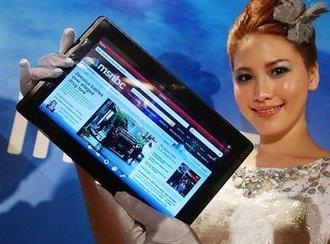
Take a look at this Asus Eee Pad EP101TC. It is ready to challenge iPad.
Asus Eee Pad EP101TC
Forrester Research predicts that the popularity of tablet PC will go far beyond the netbook in just two years from now. The result of its research shows that there will be more tablet PC sold than netbook in 2012.
Rotman Epps – the main writer of the research – said that the trend is caused by consumers’ tendency to buy a more sleek and light but strong gadget. Beside that, there is also a prediction that desktop PC will be replaced by this new tablet PC.
iPad vs Eee Pad Tablet PC itself is not a new gadget. Some vendors have already made some models since years ago. But the Apple’s iPad breaks the market with its intuitive user’s interface.


Check our best tablet PC list!
credit photo: AP Photo

Recommended 2012 Netbook

Recommended Tablet PC 2012


Want To Buy iPad? Wait For Asus Eee Pad EP121

Asus Eee Pad - DockingWant to buy iPad? You’d better wait for its competitor, the new Asus Eee Pad EP121. Why is that so? Up to now, Apple doesn’t support iPad with ability to play flash on it. Apple promote the HTML5 for iPad. While the new Asus Eee Pad EP121 with its Windows 7 Home Premium OS definitely supports flash.

This new gadget from Asus tries to compete with Apple’s iPad in tablet PC market. Seems that the prediction that netbook’s dawn has come is coming to live. What’s good in Eee Pad?
From Eee Pad’s specification, we can see that this gadget is quite strong for our daily computing needs.
What can we do with it? It can do everything just like your netbook or even notebook. It can be a multimedia player, e-reader, compact PC, surfing the net. It is also strong enough for you to run some applications together.
You’ll also be able to type your report or blog’s post with its virtual keyboard. If you want to type more comfortably, there is also a docking station that functions as your optional keyboard.
What can we do with a flash supporting Pad like Eee Pad? Playing youtube movies!!! hehe… this including playing an HD (high definition) movies.
Actually, Asus has launched some Eee Pad types. The Asus Eee Pad EP121 has 12 inch touch screen display. If you think that it is too big or too heavy, you can pick Asus Eee Pad T101T, with 10 inch screen, 1.22 cm thick, and 675 gram weight. This T101T is for students and highly mobile person. It is powered with Windows Embedded Compact 7.
Buy Asus Eee Pad EP121 or Asus Eee Pad T101T on Amazon.com


Best Recommended Accesories:
High Density Nylon Padded FlexWall Design Case for  iPad / ASUS Eee Slate EP121-1A010M
Archos 7 8GB Home Tablet with Android (Black)
ASUS Eee PC T101MT-EU27-BK 10.1-Inch Convertible Tablet (Black)
Archos 9 PC Windows 7 Starter Tablet (Black)
Apple iPad MC497LL/A Tablet (64GB, Wifi + 3G)
Otterbox APL2-iPAD1-20-C4OTR iPad Defender Series Case

Rabu, 23 Juni 2010

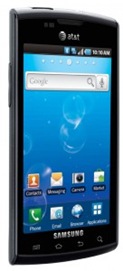
Samsung Captivate: The Android Smartphone with Bluetooth 3.0

Samsung Captivate Samsung Captivate or Samsung Galaxy S will enter US market on this July through AT&T. This smart phone uses Android 2.1 with 1 GHz Samsung Hummingbird processor. This newest Samsung gadget will provide you entertainment, messaging, and or course fulfill your web social activities through its 4 inch Super AMOLED screen.

Samsung Captivate supports your internet based tasks for it is ready with HSPA and Wi-Fi (802.11b/g/n). You can access any Google Mobile Services including Android Market, Google Search, Google Maps, Gmail, YouTube, and Google talk, or you can also utilize the Samsung Social Hub comfortably. Beside that, this Samsung smart phone won’t let you lost with its GPS receiver, completed with its voice navigation.

Samsung designs Captivate to have 6-axis censors combined with accelerometer and gyroscope, so you can play  your game smoothly just by swaying the phone. Samsung Captivate also has touch screen gesture ability, like multi-touch pinch, long tap, zoom, or vertical and horizontal swipe. Need a good sound? Don’t worry, it has 3D sound out put. You can play your stereo surround-sound via its headset.

This Captivate smart phone is more than enough to support your business. It supports push email, including Yahoo and Google Mail, or even ActiveSync. Its Swype virtual QWERTY keyboard makes you easily type every message.

Now, what about entertainment? Samsung Captivate dedicates Samsung Media Hub, and All Share to connect to DLNA (Digital Living Network Alliance) peripherals. It has 5.0 MP camera with auto-focus, able to record 720p video HD, a nice and sleek MP3 player, and a standard 3.5 mm female jack. It also gives you a chance to have up to 16 GB external memory, while it has 16 GB on-board memory. You have enough space to store your music and videos on it. One more thing, this latest Samsung Android smart phone is using Bluetooth 3.0. It assures you to exchange files with your friends much faster.

Find the latest Samsung smart phones on Amazon!!!

Minggu, 20 Juni 2010

HTC Desire, An Android Smart Phone With Optical Joystick

HTC Desire, An Android Smart Phone With Optical JoystickHTC announced the new Android smart phoneHTC Desire. This Android gadget will be available in the mid of June. Equipped with Snap Dragon 1 GHz processor and Qualcomm's Android operating system 2.1.

HTC Desire will also be completed with HTC Sense, which is useful to improve its performance to be more natural. You’ll get some pre-installed application, such as Friend Stream, some useful widgets, a new newsreader, and the newest form of the thumbnail display screen. Friend Applications Stream can combine a variety of social networking sites (Facebook, Twitter, Flicker, etc.) into a single user interface, really a great application for anyone who wants to be connected with everyone without being secluded with numerous application just to update short status.

Another good thing is the presence of Adobe Flash, optical joystick, 3.7-inch WVGA capacitive scratch free screen, 512 MB ROM memory and 576 MB RAM, WiFi, and support for 3G networks, HSPA / WCDMA 900/2100.

The HTC Desire’s optical joystick navigation is a great improvement to replace the commonly used trackball button. The optical joystick gives this gadget a better navigational performance.

HTC EVO 4G, The First WiMax Android Smart Phone

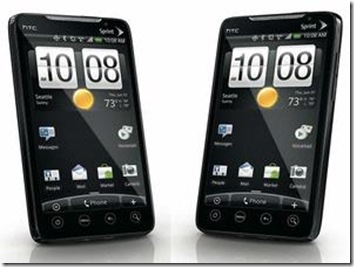
HTC EVO 4G
HTC will be the first smart phone vendor that releases the first WiMax Android smart phone. WiMax is known as the fourth generation of promising internet connection. This gadget will be called HTC EVO 4G, not HTC Supersonic as what have been rumored for a while.
It is Sprint, one of CDMA cellular operator in US, which has leaked the plan. According to the plan, the HTC EVO 4G itself will be launched on this June or July.
Compared to other Android smart phone on the market today, it can be said that HTC EVO 4G’'s specification is really superior. Hopefully, it will be able to run many ‘heavy’ application on it smoothly. It is supported with the Snapdragon 1GHz processor, 1GB internal memory, and 512 MB RAM. Unfortunately, it will only be equipped with 8GB external memory.
The screen is also better than just good. It has 4.3 inch TFT LCD with 480x800 resolution. Its GPU is able to play high definition video 720p. HTC EVO 4G completed with HDMI port to display high quality video on an external monitor that supports it. Its camera is also good. The main camera has 8 MP resolution, while its front camera has 1.3 MP.
This HTC’s gadget fully takes the advantage of the most promising mobile OS, Android 2.1. For the user interface, HTC is using Sense UI, that is commonly used on HTC’s smart phones. Beside WiMax, you’ll also have option to use WiFi 802.11b/g and CDMA200 1X EVDO internet connection.
Share this post :