Kamis, 22 Juli 2010

HP Mini Education Edition Netbook, HP Mini 100e: For You or Your Kids?

HP Mini 100e - 2Are you looking for a netbook that best suited for your kids? This HP Mini 100e is maybe one of many options for that need. Netbook for kids must have several requirements. First, it must be strong enough to deal with what children may treat it. Second, it must be able to put up with splash of water. And third, it has to be equipped with software that can support the kid to be more productive in exploring their world.
HP Mini 100e is the newest netbook from HP that will be available on the market this July. The cute design is best suited for kids. Even older people like you will be tempted to give it a try. Have a look at what Mini 100e brings:
HP Mini 100e - 1
Compared to other usual netbooks out there, HP Mini 100e's specification is not that different. It has 10.1 inch display with 1024 x 600 pixels, full QWERTY keyboard, and of course Wi-Fi and Ethernet connection.
So what is so special about HP Mini 100e?
HP Mini 100e is specially designed for kids. That's why this kid's netbook is equipped with some specific features for children. The hinges that connect its CPU and the screen are made from metal. Its keyboard is made to put up with water's splashes. From the software side, this Mini 100e is powered with Microsoft Office 2010, Microsoft Math, and Microsoft Security Essentials.

Rabu, 21 Juli 2010

Kingston 64GB SDXC,

Kingston 64GB SDXC
On the last June, Kingston had just released its newest memory card, the Kingston 64GB SDXC (secure Digital eXtended Capacity) UHS-1 Class 10. This new memory card brings the new technology in it.
What is SDXC? SDXC is a new standard given by Secure Digital Association (SDA) for SD card that has capacity from 32 GB up to 2 TB. Besides its bigger capacity, the SDXC card also offers a higher data transfer rate while maintaining the shape of popular SD card.
This SDXC Kingston's card is fully compatible with other SDA memory cards with 3.01, UHS-1 version. UHS-1 is the abbreviation of Ultra-High Speed Bus1 that becomes the new architecture of SDXC to let it has a maximum transfer rate 104MB/sec., and 300MB/sec. In the near future, SDXC card will use exFAT file system that will no longer compatible with SDHC or traditional SD card.
The next Digital Camera and Video Camera from and Panasonic) are now developed to have an SDXC slot on them. Other electronic products will also support SDXC. Among many popular electronic peripherals, those which will take advantage of this fast storage are HDTV, Blue-Ray Disc Player, navigational gadgets, cell phones, and computers.

Toshiba Portege R700, A Slim but Strong Notebook

Toshiba has just released the world's first double screens notebook. The Toshiba Libretto. It is really a breakthrough! Beside this new breathtaking notebook, Toshiba also launched its newest ultra portable notebook, the Toshiba Portege R700.
Toshiba Portege R700, slim but strong inside Look at how Toshiba designed this Portege R700. It has 13.3 inch screen, with 1.39 kilograms weight. But it is only 2.57 cm thick. How about that?
Although Toshiba Portege R700 is "that" thin, it doesn't mean that it is not tough for your daily computing need.
It is powered with Intel's newest processors. You have an option to choose the i3, i5, or i7. Of course it depends on how deep you put your hand into your pocket.
This Toshiba notebook uses bee's nest structure like, just like as what have been used on carbon layer at F-1 cars to strengthen its material without adding some extra weigh. Portege R700 is also the first Toshiba's notebook that uses Fresh Air Cooling Technology to keep it cool even if you use it in a long time computing.
Want to see Toshiba Portege R700 specification?

Selasa, 20 Juli 2010

Toshiba Portege R700 Specification

Toshiba-Portege-R700 Toshiba Portege R700 is one of the newest Toshiba notebook on the market today. Among other newest Toshiba line up, the R700 brings some new features. Here is the specification:
Want to see the Toshiba Portege R700 brief review?

Sabtu, 10 Juli 2010

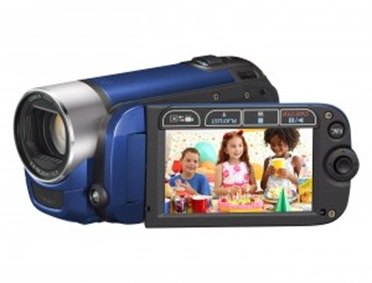
Canon Legria FS36: SD Camcorder With Fast Battery Charging

High Definition video format maybe now the star in video's technology. But it doesn't mean that the Standard Definition (SD) video format has loosen its charm. Canon Legria F36 comes to claim its place as the leader in SD video format camcorder. SD video still offers you a great image quality.
Canon Legria FS36
Legria FS36 comes with 2.7 inch wide screen LCD. It is also much lighter compared with other Canon Legria's series. It is only 225 grams, the same with Canon Legria FS306. That's why Canon Legria F36 is the best camcorder for those who need simplicity, and do not want to be bothered with heavy camcorder to capture your every great moments. You can bring it everywhere. Even your jacket pocket can keep this great gadget in it. This is small camcorder is powered with Canon DIGIC DV II.
Don't underestimate Legria F36 based on its small size. It has 41x optical zoom. Pretty great for a small camcorder. Canon also completes this F36 with Dynamic Mode Image Stabilization to improve your videos.
Just like Canon Legria HF S21, Legria FS36 is also completed with flash internal memory and SD/SDHC memory slot. It has 8GB internal memory. It enables you to record up to five hours great quality videos.
One more thing, you can recharge FS36's battery in just 20 minutes. This fast battery charging will empower the camcorder to record 3.5 hours video!
Canon camcorder's accesories:
Canon SCA60 Soft Carrying Case for most Canon Camcorders
Canon NB-2LH Rechargeable Battery Pack for Rebel XT/XTi Digital SLR Cameras and VIXIA HV Series and ZR Series Camcorders (Retail Package)
Canon DW-100 DVD Burner for Canon Hard Drive and Flash Memory Based Camcorders
Mobile PowerFlex Car Travel Power Adapter for your Canon / Sony / Samsung / Panasonic / Sanyo / JVC and MANY other Camcorders! Includes Micro USB cable for charging mobile phones and USB compatible devices
Built Cargo Large Camera Bag (Black Raspberry)

Selasa, 06 Juli 2010

Canon Legria HF S200: A Camcorder With Binocular Technology

From their features and specification, you can see that Canon Legria HF S200 and Canon Legria HF S21 are almost identical. One of their identical feature is the Smart Auto. At first, this Smart Auto feature introduced on Canon's digital cameras. But now you can also enjoy the great Smart Auto feature on your Canon HD camcorder. Smart Auto is a mode to let you record your videos a lot easier, especially for new users and beginners.
Canon Legria HF S200 With this feature, your Canon camcorder will automatically detect and analyze the brightness, color, distance, and movement. Based on the result then, the camcorder will choose the best setting for the scenes that are being taken. There are 31 different scenes that are recognized by this Smart Auto feature on Canon's HD camcorders like the Legria HF S200 and Legria HF S21 without any interfere from the user.
Another interesting feature of this Legria HF S200 is the use of 8,59 mega pixel CMOS sensor. It has 10x optical zoom and Powered IS feature. Beside the Dynamic SuperRange Optical Image Stabilization, the Powered IS provides a higher compensation for any disturbing movements. It will reduce any unwanted blurred videos when you use it to take videos with maximum zooming. You can activate this pretty great feature by pushing the Powered IS button on LCD panel. The Powered IS feature is actually adopted from Canon Binocular. It guarantees a great sharp and focus videos or photo.
Now, the question is what are the differences between HF S21 and HF S200? The main difference is the amount on their internal memory. HF S21 has 64GB flash memory, while the HF S200 has no internal memory. That's why you have to spend extra money to buy separate memory card.
The other difference is that HF S200 has now electronic viewfinder. All tasks are supposed to be done on its LCD screen.
These Canon Legria HF S21 and HF S200 are camcorders with rich and powerful features. It is really the best choice for advanced users. Are you?
Share this post :

Technorati Tags: ,,

Senin, 05 Juli 2010

Canon Legria FS306: Brings You The Simplicity of Taking Videos

CANON LEGRIA FS306 Compared to other Legria's series, this Canon Legria FS306 is the most compact and simplest camcorder. Looking from its weight, well, it cannot be categorized as a very light weight camcorder. FS306 is 225 grams. But, its small size makes it comfortable to bring it anywhere you want to go.
The same as Canon Legria FS36, the FS306 also records video in SD (Standard Definition) format. It has 41x Advanced Zoom feature in default mode. Beside that, FS306 also gives you 37x optical zoom. It equivalent with 2000x digital zoom.
This high level zooming is a result of the Dynamic Image Stabilization facility of this camcorder. This image stabilizer has the biggest role to make sure that the videos you are shooting are smoothly flow. It simply enables you to record videos as you walking up the stairs or walking along the street. All you have to do is just by switching from Standard Mode into Dynamic Range.
This Canon Legria FS306 has some more additional feature that are also available on FS36, that are Video SnapShot and Pre REC and Quick Start Mode. The Video SnapShot and Pre REC feature is not proprietary of FS306 and FS36. The other six Canon Legria series also have them.


Read the specification of Canon Legria FS 306 here!

How to operate Video SnapShot feature?
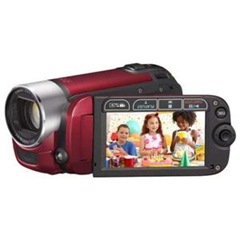
CANON LEGRIA FS306 red It is pretty simple to operate the Video SnapShot feature on Legria FS306. You only need to push the record button and a four seconds length video clip will be automatically taken. This is always happen when you push the record button. Why 4 seconds? Because that is the average length of a TV standard cutting. But you can set the Video SnapShot to record in 2 or 8 seconds.
While on the Pre REC mode, the camcorder will start to record video about 3 seconds before you push the record button. This three seconds recording will be automatically added into your video. This is to make sure that you don't miss your unrepeatable moments. Don't forget to choose the Standby Quick Start mode to let your Legria FS306 active in less than one second without pushing any button, but spread the LCD screen.
And then how to make and replay those video clips? You don't even need a PC to do this. Choose some clips you want play, add them into a list. It is also possible for you to add some music. Canon has added some free music tracks inside this Legria FS306 for you to use. Of course you can upload your very own tracks. Just make sure that they are in WAV music format with included Music Transfer Utility.
Canon Legria FS 306 is available in three body colors: silver, red, and blue.
Buy Canon Legria FS 306 from Amazon.com